Nadakacheri Karnataka (ನಾಡಕಛೇರಿ ಕರ್ನಾಟಕ)
Nadakacheri Karnataka is the official platform for accessing a wide range of certificate-related services under the Atalji Janasnehi Kendra (AJSK) Project, initiated by the Revenue Department, Government of Karnataka. Citizens can use this portal to apply for essential documents such as income certificates, caste certificates, domicile certificates, residence certificates, and more—either online or through designated offline centers across Karnataka.
Through nadakacheri.karnataka.gov.in, applicants can access both online and offline services, track application status, and reprint issued certificates with ease. By integrating technology and citizen-friendly processes, Nadakacheri simplifies tasks that were once time-consuming, making it an essential hub for Karnataka residents seeking quick access to official records and e-governance solutions.
Overview of Nadakacheri (AJSK) Portal
| Attribute | Details |
|---|---|
| Portal Name | Nada Kacheri Karnataka (AJSK) |
| Implemented As Part Of | Atalji Janasnehi Kendra (AJSK) Initiative |
| Responsible Department | Revenue Department, Government of Karnataka |
| Year of Introduction | 2012 |
| Primary Purpose | To offer citizens a convenient and digital way to access Revenue Department services under the AJSK framework. |
| Available Languages | Kannada and English |
| Official Platform | Government-operated Nadakacheri online portal |
| Latest System Version | Version 5.0 |
| Online Services Count | More than 40 citizen services |
| Application Methods | Online portal and Atalji Janasnehi Kendras (physical centers) |
What is Nadakacheri?
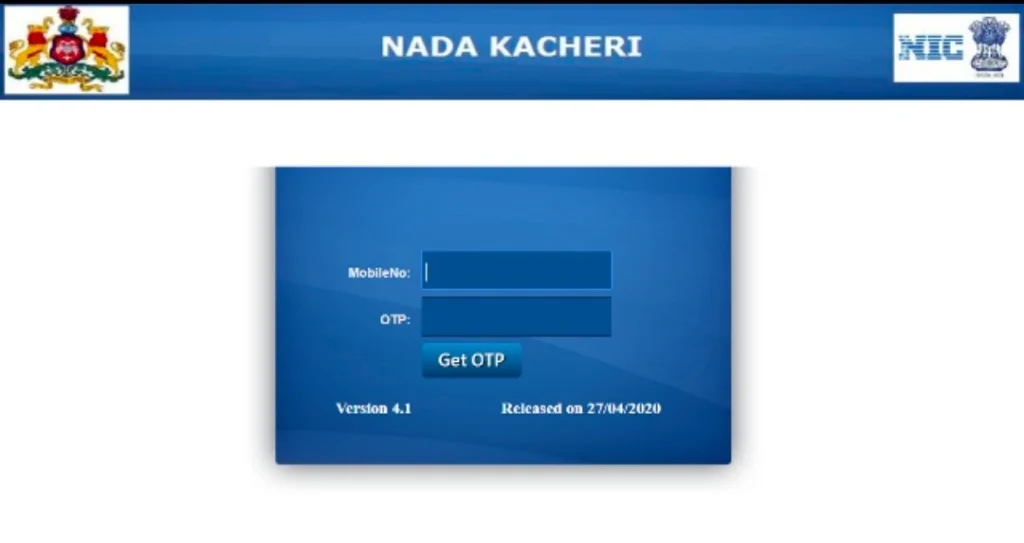
Nadakacheri, meaning “State Office” in Kannada (ನಾಡಕಚೇರಿ), refers to a citizen service platform introduced to streamline access to government certificates. Traditionally, these services were available only through taluk offices or Janasnehi Kendras. The launch of the Nadakacheri portal under the AJSK project enabled citizens to apply for certificates and track applications online, improving transparency and reducing the need for in-person visits.
The platform supports bilingual service in Kannada and English, and provides services like caste certificates, income certificates, residence certificates, and various social welfare scheme applications.
Services Available on the Nadakacheri (AJSK) Portal
Applicants can access the following services through the online Nadakacheri portal or at their respective taluk-level Atalji Janasnehi centers:
Agricultural Services
- Agriculturist Certificate
- Agricultural Labour Certificate
- Landless Certificate
- No Tenancy Certificate
- Bonafide Certificate
- Land Holding Certificate
- Small/Marginal Farmer Certificate
- Solvency Certificate
Caste Certificate Services
- SC/ST Caste Certificate
- OBC Certificate (Central)
- General Certificate (Arya Vysya)
- Caste Certificate (Migrants)
- Income & Asset Certificate (EWS)
- Minority Certificate
General Certificates
- No Government Job Certificate
- Surviving Family Member Certificate
- Not Re-Married Certificate
- Population Certificate
- Widow Certificate
- Living Certificate
- Family Tree Attestation
- Unemployment Certificate
Income Certificate Services
- Income Certificate
- Income Certificate for Compass
- Non-Creamy Layer Certificate
Residence Certificate Services
- Residence Certificate
- Domicile Certificate
- Hyderabad-Karnataka Region Eligibility Certificate
- HK Region Residence Certificate
Social Security Pension Schemes
- Sandhya Suraksha Yojane
- Indira Gandhi National Old Age Pension
- Widow Pension
- Physically Handicapped Pension
- Mythri Scheme
- Manaswini Scheme
- Acid Victim Pension
- Endosulfan Victim Pension
- National Family Benefit Scheme
- Farmer Widow Pension
Key Features of Nadakacheri 5.0 Portal
- Unified Access: Apply for multiple certificate services using a single login with mobile number and OTP.
- Application Status Tracking: Check the status of any application using the RD Number.
- SMS Notifications: Automatic updates are sent to the applicant’s registered mobile number throughout the application process.
- Certificate Download: Once approved, certificates can be downloaded directly through the portal.
- Reprint Option: Lost or damaged certificates can be reprinted for ₹40.
- E-sign Integration: Aadhaar-based e-signing is enabled for most services.
How to Use the Nadakacheri Portal
Step 1: Visit the Portal
Go to the official website – https://nadakacheri.karnataka.gov.in/AJSK
Step 2: Login
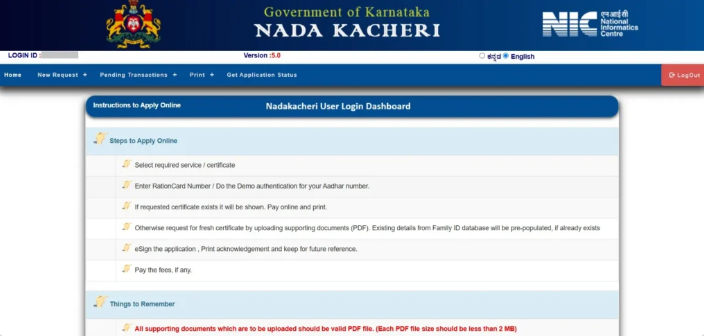
Click on “Online Application” and log in using your mobile number and OTP. No registration is needed.
Step 3: Choose a Service
From the “New Request” section, select the certificate or service you want to apply for (like Income Certificate, Caste Certificate, etc.)
Step 4: Enter Details & E-Sign
Fill the application form correctly. Then verify using Aadhaar OTP to complete the e-sign process.
Step 5: Pay the Fee
Use any UPI or online method to pay the service fee.
Step 6: Track Application
Click on “Get Application Status” to check your application progress using the RD number.
Step 7: Download/Print Certificate
Once approved, go to the “Print Certificate” section to download or print your document.
Sample Documents Required (Varies by Service)
| Common Documents | Additional Based on Certificate Type |
|---|---|
| Aadhaar Card | Income Proof / Ration Card |
| Mobile Number | School Certificates / Caste Proof |
| Passport Photo | Residence Proof (Utility Bills, Rental Deed) |
Nadakacheri Technical Helpdesk
For issues related to portal access or service delivery, applicants can reach out via email:
- Email: helpdeskajsk@gmail.com
- Official Website: nadakacheri.karnataka.gov.in
Frequently Asked Questions (FAQs)
1. Is registration required to use the Nadakacheri (AJSK) portal?
No prior registration is required on the Nadakacheri portal. Users can simply log in by entering any valid mobile number and verifying it through an OTP to access available services.
2. Where can I submit a Nadakacheri application offline?
Offline applications for Nadakacheri services can be submitted at nearby Nada Kacheri offices, Atalji Janasnehi Kendras (AJSK), or the Revenue Department office of your respective Taluk.
3. What should I do if I do not receive the OTP while logging in?
If the OTP does not arrive, wait a few minutes and refresh the login page before trying again. If the issue continues, you may attempt to log in using another mobile number to proceed.
4. Can the same mobile number be used for more than one Nadakacheri service?
Yes, a single mobile number can be used to apply for multiple Nadakacheri services. However, each service requires a separate application and the applicable service fee must be paid individually.