Apply for Caste, Income, Domicile & Other Certificates via Nadakacheri 5.0 Portal
The Government of Karnataka has made it extremely convenient for citizens to apply for important certificates and welfare services online through the Nadakacheri 5.0 portal (also known as AJSK). Using this platform, applicants can submit requests for caste, income, domicile, residence certificates, pension schemes, and many other Revenue Department services without visiting government offices.
Below is a step-by-step, easy-to-understand guide explaining how to apply for certificates through the Nadakacheri portal successfully.
How to Apply for Certificates on Nadakacheri 5.0 Portal
Step 1: Login to Nadakacheri 5.0
Open the Nadakacheri 5.0 Public Login page and log in using your mobile number.
- Enter your mobile number
- Verify using OTP
- No registration or account creation is required
This makes Nadakacheri access simple for all citizens.
Step 2: Access the Citizen Dashboard
After successful login, the Citizen Dashboard will appear on the screen.
- Click on New Request
- Select the certificate or service you want to apply for
(Income Certificate, Caste Certificate, Domicile, etc.)
Each Nadakacheri service includes clear information about required documents and applicable fees.
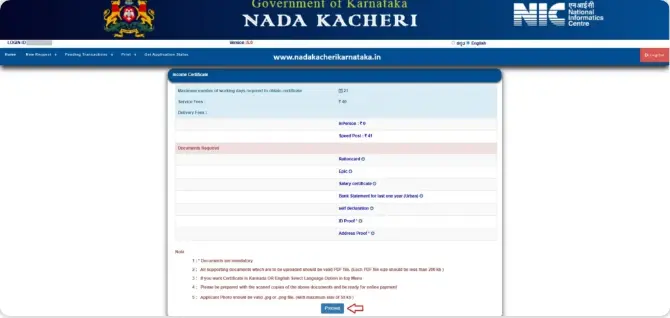
Step 3: Open the Online Application Form
Once you choose a service, the relevant online application form will open.
- Review the instructions carefully
- Click Proceed to start filling out the form
(For example, if you select Income Certificate, the Income Certificate form will be displayed.)
Step 4: Ration Card or Aadhaar Verification
The system will ask whether you have a ration card.
If Yes:
- Enter ration card number
- Select applicant name from family list
If No:
- Complete Aadhaar authentication
- Enter Aadhaar number
- Verify using OTP
This step helps Nadakacheri fetch accurate personal details.
Step 5: Fill Applicant Personal Details
Now enter required personal information such as:
- Father’s / Husband’s name
- Address (as per Aadhaar) with pincode
- Mobile number & email ID
Verify both mobile number and email using OTP, then click Next.
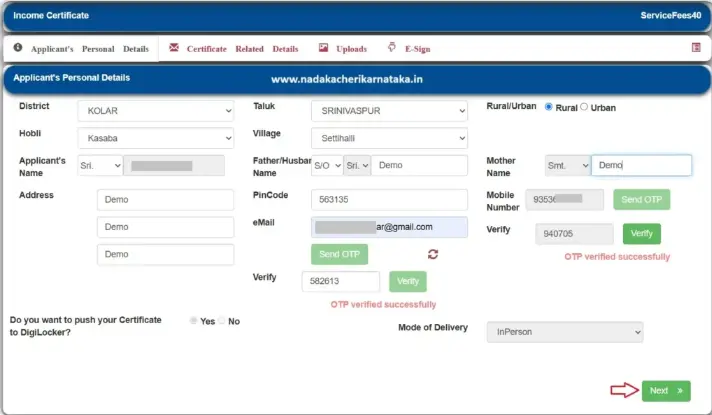
Note: Some services may ask for extra details depending on the certificate type.
Step 6: Upload Required Documents
Upload all supporting documents in PDF format only.
- Each document size must be below 200 KB
- Click Upload Document for each file
- After uploading all documents, click Submit
Step 7: Aadhaar e-Sign Process
Before final submission, Nadakacheri requires e-Sign verification.
- Enter Aadhaar number
- Click Get OTP
- Enter OTP received on registered mobile number
This digitally signs your application.
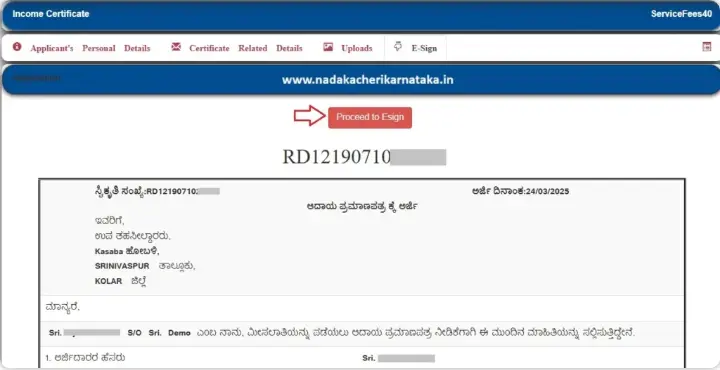
Step 8: Fee Payment & Acknowledgement
If any service fee applies:
- Pay using UPI / online payment
- Submit the application
After payment, an acknowledgement slip with a unique RD number is generated.
Download or print it for future reference.
Track Your Nadakacheri Application Status
Once submitted, you can track your application anytime using the Get Application Status option in the Citizen Dashboard.
Applications are processed by the selected Hobli Revenue Office.
Important Points to Remember
- Only PDF documents below 200 KB are accepted
- Application is valid only after e-Sign and payment
- In case of failed payment or e-Sign, retry using Pending Transactions
- Keep the RD number safe for tracking and certificate download
Nadakacheri 5.0 – Key FAQs
What services are available on Nadakacheri 5.0?
Nadakacheri 5.0 allows citizens of Karnataka to apply online for caste, income, domicile, residence certificates, pensions, and other Revenue Department services without visiting offices.
Is registration required to use Nadakacheri?
No registration is needed. Applicants can directly log in to the Nadakacheri portal using a mobile number and OTP.
Can I apply without a ration card on Nadakacheri?
Yes, if a ration card is not available, Nadakacheri supports Aadhaar-based authentication through OTP verification.
Is Aadhaar e-Sign compulsory for Nadakacheri applications?
Yes, Aadhaar e-Sign is mandatory. Applications are considered valid only after successful e-Sign and payment (if applicable).
How can I track my Nadakacheri application status?
Applicants can check the status anytime using the Get Application Status option in the Nadakacheri Citizen Dashboard with the RD number.